
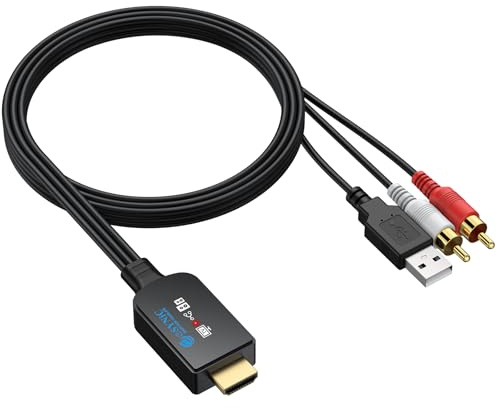
eSynic eARC ARC Audio Extractor Cable Support CEC Built in HDMI/RCA Cable | 192khz ARC HDMI to RCA Audio Extractor, Set the Format as PCM, Plug&Play, for HDTV to Speaker, Amplifier, Not for Dolby, DTS
Offer

£ 25.26
free shipping
go to shop
Product description
- *All-in-One Cable for a Tidy Setup*----: This Upgraded eARC Audio Extractor Integrates the HDMI Connector, Processing Chip, and 1.5m RCA Cable Into a Single, Neat Unit.
- It Connects Your TV's eARC/ARC Port Directly to Your Amplifier or Speakers Without Extra Boxes or Clutter—Keeping Your Entertainment Space Organised and Simple
- (NOTE: The TV's HDMI Port Must Have an eARC/ARC Icon; Otherwise, Audio Conversion Is NOT Compatible) *Control Volume With Your TV Remote*----: This HDMI ARC Audio Extractor Supports HDMI-CEC, Allowing You to Adjust the Volume of Your Connected Audio System Using Your Existing Television Remote.
- Enjoy a More Convenient Experience Without Reaching for Multiple Remotes (Functionality May Vary Depending on Your TV's CEC Support.) *High-Quality Stereo Sound Made Simple*----: As a Dedicated eARC Extractor, It Delivers Clear 2.0-Channel PCM Stereo Audio, Supporting Sampling Rates Up to 192kHz for Detailed and Stable Sound.
- It's Designed to Work Seamlessly Once Your TV's Audio Output Is Set to "PCM"—No Drivers or Software Required *Plug & Play USB-Powered Design*----: This Straightforward HDMI eARC Audio Extractor Is Effortless to Set Up: Connect the HDMI to Your TV's eARC/ARC Port, Plug the USB Into Your TV for Power, and You're Ready to Go.
- The Built-In Chip Handles the Audio Extraction Automatically for an Instant, High-Fidelity Listening Experience *Wide Compatibility With Clear Guidance*----: This Versatile eARC Audio Extractor Works With TVs Featuring an HDMI ARC or eARC Port and Most Audio Devices With RCA Inputs.
- For Best Results, Follow Our Simple Three-Step Setup: Connect to the Correct HDMI Port, Enable CEC in Your TV Settings, and Select "PCM" Audio Output
You might also be interested in these audios.

Focusrite Scarlett Solo 3rd Gen USB-C Audio Interface | 1 XLR Mic Preamp, 1 Hi-Z Instrument Input, 24-Bit/192kHz, 56dB Gain Range, Air Mode, macOS/Windows/iPadOS Compatible
Pro performance with the finest pre-amps - Achieve a brighter and a more open recording thanks to the best performing mic pre-amps the Scarlett range has ever seen.
£ 77.00
free shipping
To the product (3 offers)

Focusrite Scarlett Solo 4th Gen USB-C Audio Interface | 1 XLR Mic Preamp, 1 Hi-Z Instrument Input, 24-Bit/192kHz, 120dB Dynamic Range, Air Modes, PC/Mac/iPad Compatible
The songwriter's interface: Plug in your mic and guitar and let Scarlett Solo bring big studio sound to wherever you make music.
£ 118.89
free shipping
To the product (4 offers)

M-Audio M-Track Solo – USB Audio Interface for Recording, Streaming and Podcasting with XLR, Line and DI Inputs, Plus a Software Suite Included
Podcast, Record, Live Stream, This Portable Audio Interface Covers it All - USB sound card for Mac or PC delivers 48kHz audio resolution for pristine recording every time Be ready for anything with this versatile M-AUDIO interface - Record guitar, vocals or line input signals with one combo XLR/Line Input with phantom power and one Line/Instrument input Everything you Demand from an Audio Interface for Fuss-Free Monitoring - 1/8" headphone output and stereo RCA outputs for total monitoring flexibility; USB/Direct switch for zero latency monitoring Get the best out of your Microphones - M-Track Solo’s transparent Crystal Preamp guarantees optimal sound from all your microphones including condenser mics Whether you’re a Podcaster or Beat Maker, this software suite won’t disappoint - Includes MPC Beats with 3 Virtual Instruments, 80 FX Plugins and 2GB Factory Content
£ 32.00
free shipping
To the product (5 offers)

M-Audio M-Track Duo – USB Audio Interface for Recording, Streaming and Podcasting with Dual XLR, Line & DI Inputs, plus a Software Suite Included
Podcast, Record, Live Stream, This Portable Audio Interface Covers it All – USB sound card for Mac or PC delivers 48 kHz audio resolution for pristine recording every time Be ready for anything with this versatile M-Audio interface - Record guitar, vocals or line input signals with two combo XLR / Line / Instrument Inputs with phantom power Everything you Demand from an Audio Interface for Fuss-Free Monitoring – 1/4” headphone output and stereo 1/4” outputs for total monitoring flexibility; USB/Direct switch for zero latency monitoring Get the best out of your Microphones - M-Track Duo’s transparent Crystal Preamps guarantee optimal sound from all your microphones including condenser mics Whether you’re a Podcaster or Beat Maker, this software suite won’t disappoint - Includes MPC Beats with 3 Virtual Instruments, 80 FX Plugins and 2GB Factory Content
£ 44.00
free shipping
To the product (4 offers)

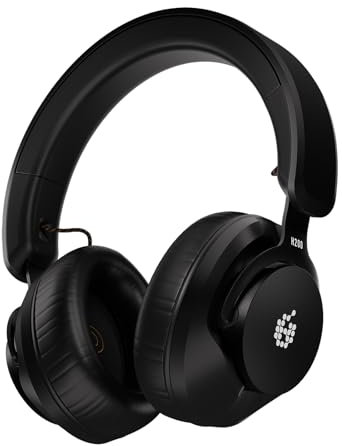
ADAM Audio H200 Closed-Back Studio Headphones | Closed-Back, 40mm PEEK Drivers, 32 Ohm, Sonnox Calibration, Detachable Cable, Replaceable Pads
Take ADAM Audio sound quality wherever you go with the Berlin-designed H200 headphones The 40 mm PEEK Performance Drivers offer a smooth and balanced 2 Hz - 23.5 kHz frequency response, 112.5 dB SPL, and low distortion.
£ 122.00
To the product (3 offers)

FIFINE SC3 RGB Gaming Audio Mixer Interface | Streaming PC Audio Mixer with XLR Mic Input, Individual Channel. Custom Soundboard for Podcast, DJ, Recording, Vocal.
[Dynamic Visual Spectacle] Gaming mixer audio, a versatile device elevates your audio experience to new heights.
£ 53.90
free shipping
To the product (1 offer)


OneOdio Wired Over Ear Headphones Hi-Fi Sound & Bass Boosted headphone with 50mm Neodymium Drivers and 1/4 to 3.5mm Audio Jack for Studio DJ AMP Recording Monitoring Phones Laptop (Red)
Hi-Res Audio Performance: Experience studio-grade clarity with OneOdio Pro10 Studio headphones.
£ 34.99
free shipping
To the product (2 offers)
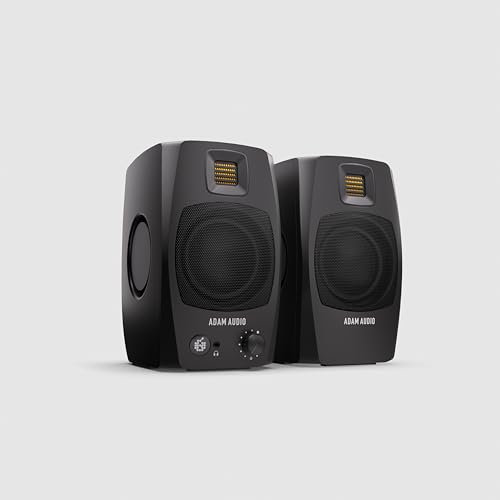
ADAM Audio D3V Active Desktop Studio Monitor Speakers - Black | USB-C, D-ART Tweeter, 3.5in Woofer, 240W, 45Hz-23kHz, 97dB SPL, Balanced TRS, Headphone Out
Studio Sound for Every Setup - Bring ADAM Audio’s renowned studio precision to your desktop.
£ 249.00
free shipping
To the product (2 offers)

Universal Audio VOLT2 USB Audio Interface for recording, podcasting and streaming
Easily create music productions, livestreams, and podcasts on Mac, PC, iPad, and iPhone Record vocals and instruments with rich, full sound using Vintage Mic Preamp mode Produce with industry-leading software including Ableton, Melodyne, UJAM's Virtual Drummer, Marshall, Ampeg, and more International products have separate terms, are sold from abroad and may differ from local products, including fit, age ratings, and language of product, labeling or instructions.
£ 134.99
free shipping
To the product (3 offers)
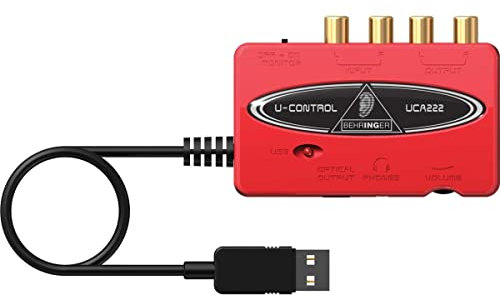
Behringer UCA222 USB Audio Interface, 2x2 RCA to USB Converter for Analog-to-Digital Audio Recording on PC and Mac
2-input / 2-output USB audio interface for converting analog RCA audio sources to digital format Supports up to 48 kHz digital audio conversion via USB connection Stereo RCA inputs and outputs for connection to mixers, cassette decks, or other analog audio equipment USB-powered design — no external power supply required Class-compliant USB audio device compatible with Windows and macOS systems
£ 16.60
To the product (4 offers)


ADAM Audio T5V Studio Monitor | 2-Way, U-ART Tweeter, 5" Woofer, 70W, 45Hz-25kHz, 106dB SPL per pair, XLR/RCA, Low/High Shelf EQ
Transformative feedback for recording, producing, or mixing – Whether you are creating music, editing your next podcast, tracking guitar, or composing for film, the revealing nature of ADAM Audio’s signature tweeters and woofers will enhance your sound.
£ 158.71
free shipping
To the product (3 offers)

ZOOM H1essential Handy Recorder – Portable Audio Recorder with 32-Bit Float for Music, Podcast, Film & Content Creation – Black
32-BIT FLOAT RECORDING – Gain can be set before recording, but it's not rquired.
£ 85.00
free shipping
To the product (5 offers)