
AsiaHorse AURORA-CO ARGB PSU Cable Cover Kit Black, RGB LED Light Strip Sleeve for Motherboard 24Pin and GPU 8Pin/12+4Pin Power Cables, 5V 3Pin ARGB Sync, PC Cable Management Lighting Vest
Offer

£ 30.68
free shipping | 1-2 Days
go to shop
Product description
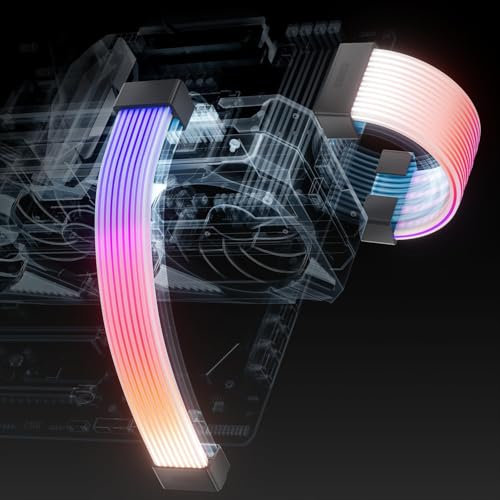
- Innovative ARGB Vest Design (Not a Power Cable): This product is an aesthetic LED lighting cover designed to clip onto your existing PSU cables (compatible with original or sleeved cables). It cleverly hides messy wires while adding a futuristic glow to your build.
- The kit includes a 24-Pin strip for the motherboard and a versatile GPU strip compatible with 8-Pin, double 8-Pin, and the latest 12+4 Pin (12VHPWR) GPU cables. (Note: Not compatible with extra-wide triple 8-Pin cables).
- Stunning 3D Stereoscopic Lighting: Featuring high-density ARGB LEDs (80 LEDs on the 24-Pin strip, 81 LEDs on the GPU strip), the AURORA-CO delivers smooth, gap-free illumination from both the front and sides.
- The 3D light effect creates a dazzling, multi-layered visual experience that eliminates the "LED bead" look found in cheaper strips. 5V ARGB Sync & Daisy Chain: Fully supports customizable lighting via 5V 3-Pin headers on motherboards from ASUS Aura Sync, MSI Mystic Light, GIGABYTE RGB Fusion, and ASRock.
- The modular daisy-chain design allows you to connect multiple strips seamlessly, making cable management easier and ensuring synchronized lighting effects across your entire system. Easy Clip-On Installation: No complex re-wiring required. The installation is beginner-friendly: 1. Attach your existing cable to the light strip base.
- 2. Secure it with the included transparent clips. 3. Connect the ARGB header. This separates the current transmission (via your real power cable) from the lighting, ensuring zero impact on your PSU's power stability.
- Important Power Requirement: Since these high-brightness strips contain over 160 LEDs combined, they require sufficient power.
- Please ensure your ARGB Hub or Motherboard header provides adequate amperage. Insufficient power may cause flickering or dim white light (as white consumes the most power). If using a hub, ensure it is SATA-powered; otherwise, connect directly to the motherboard's 5V 3-Pin header.
You might also be interested in these motherboards.

MSI A520M-A PRO Motherboard, mATX, AM4 | AMD Ryzen 3rd Gen Processors, DDR4 Boost (4600MHz/OC), 1 x PCIe 3.0 x1, 1 x M.2 Gen3 x4, Gigabit LAN
Powered by 3rd generation AMD Ryzen 9, Ryzen7, Ryzen 5, Ryzen 3, ryzen pro AM4 to maximize connectivity and speed with turbo M.2, PCIe 3.0, USB 3.2 Gen1 and up to 64GB of DDR4 (4600MHz) Core Boost technology combines optimized power circuit layouts and digital power design which allows for precise and steady current delivery to the CPU AUDIO BOOST which rewards your ears with studio grade sound quality for the most immersive gaming experience High level PCB design with a 2oz thickened copper ensure stable power supply, better durability and reliability for high-end CPU Dragon Center: A brand new software which integrates all MSI exclusive tools with user friendly user interface
£ 38.99
free shipping
To the product (17 offers)

Gigabyte B650 EAGLE AX Motherboard - Supports AMD Ryzen 7000 CPUs, 12+2+2 Phases Digital VRM, up to 7600MHz DDR5 (OC), 1xPCIe 5.0 + 2xPCIe 4.0 M.2, Wi-Fi 6E 802.11ax, GbE LAN, USB 3.2 Gen2
AMD Socket AM5:Supports AMD Ryzen 7000 Series Processors Unparalleled Performance:12+2+2 Phases Digital VRM Solution Dual Channel DDR5:4*SMD DIMMs with AMD EXPO & Intel XMP Memory Module Support SuperSpeed Storage:1*PCIe 5.0 + 2*PCIe 4.0 M.2 Connectors Advanced Thermal Design & M.2 Thermal Guard:To Ensure VRM Power Stability & 25110 M.2 SSD Performance
£ 119.53
free shipping
To the product (11 offers)


MSI MPG B550 GAMING PLUS Motherboard, ATX, AM4 | AMD Ryzen 3rd Gen CPU, DDR4 Boost (4400MHz/OC), PCIe 4.0/3.0 x16, PCIe 3.0 x16, M.2 Gen4 x4, M.2 Gen3 x4, Gigabit LAN
Powered by 3rd generation AMD Ryzen 9, Ryzen7, Ryzen 5 AM4 to maximize connectivity and speed with dual M.2, PCIe 4.0, USB 3.2 Gen2 and up to 128 GB of DDR4 (4400 MHz) With 3rd Gen Ryzen processors, this motherboard features the recent Lightning Gen 4 solution on both PCI-E and M.2 slot, which allow for faster data transfer on graphics cards, storage devices and networking devices Mystic Light provides a complete function to control the RGB light all around the system; it supports both RGB and RAINBOW LED strip and 16.8 million colours29 effects controlled in one click AUDIO BOOST which rewards your ears with studio grade sound quality for more immersive gaming experience Enhanced Thermal Solution includes extended heatsink, 7 WmK level thermal and choke pad with 2 oz thickened copper PCB to ensure better performance for gamers
£ 89.10
free shipping
To the product (16 offers)
15% off
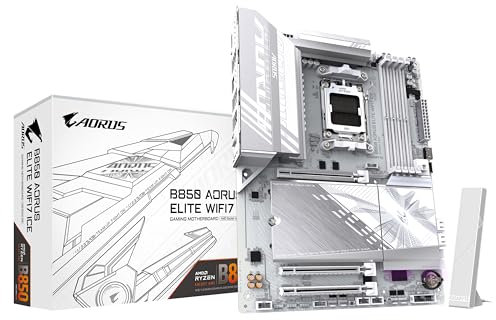
GIGABYTE B850 AORUS ELITE WIFI7 ICE Motherboard - AMD Ryzen 9000 Series CPUs, 14+2+2 Phases Digital VRM, up to 8200MHz DDR5 (OC), 1xPCIe 5.0 + 2xPCIe 4.0 M.2, 2.5 LAN, WIFI 7, USB 3.2 Gen 2x2
Gigabyte
£ 156.99
free shipping
To the product (1 offer)

ASUS TUF Gaming B550-PLUS (WI-FI), AMD B550 (Ryzen AM4) ATX motherboard (PCIe 4.0, dual M.2, 10 DrMOS, DDR4 4400, Intel® WiFi 6, 2.5 Gb Ethernet, HDMI, DisplayPort, USB 3.2 Gen 2 Type-A and Type-C)
AMD AM4 socket: Ready for Ryzen 5000 Series/ 4000 G-Series/ 3000 Series Desktop Processors Best gaming connectivity: PCIe 4.0-ready, dual M.2, USB 3.2 Gen 2 Type-C plus HDMI 2.1 and DisplayPort 1.2 output support Smooth networking: Intel 2.5Gb Ethernet with ASUS LANGuard - Robust power solution: Teamed power stages with ProCool power connector, high-quality alloy chokes and durable capacitors Renowned software: Intuitive dashboards for UEFI BIOS and ASUS AI Networking make it easy to configure gaming builds DIY-friendly design: Includes pre-mounted I/O shield, BIOS FlashBack, Q-LEDs and SafeSlot
£ 95.99
free shipping
To the product (12 offers)
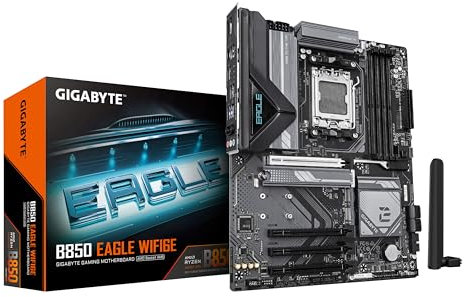
Gigabyte B850 EAGLE WIFI6E Motherboard - AMD Ryzen 9000 Series CPUs, 8+2+2 Phases Digital VRM, up to 8200MHz DDR5 (OC), 1xPCIe 5.0 + 2xPCIe 4.0 M.2, GbE LAN, WIFI 6E, USB 3.2 Gen 2
8+2+2 Phases Digital VRM with DrMOS Dual Channel DDR5:4*DIMMs PCIe Gen5 x16 with PCIe UD Slot & EZ-Latch Plus M.2 Gen5 with EZ-Latch Plus, Advanced MOSFET Heatsinks Wi-Fi 6E with WIFI EZ-Plug, Q-Flash Plus
£ 144.99
free shipping
To the product (1 offer)
18% off

MSI B850 GAMING PLUS WIFI6E Motherboard, ATX - Supports AMD Ryzen 9000 / 8000 / 7000 Processors, AM5 - DDR5 Memory Boost 8200+ MT/s (OC), PCIe 4.0 x16, M.2 Gen5, Wi-Fi 6E, 2.5G LAN
ULTRA POWER - SUPPORTS THE LATEST
£ 101.99
free shipping
To the product (15 offers)
15% off

MSI B550-A PRO Motherboard, ATX, AM4 | AMD Ryzen 3rd Gen CPU, DDR4 Boost (4400MHz/OC), PCIe 4.0/3.0 x16, PCIe 3.0 x16, M.2 Gen4 x4, M.2 Gen3 x4, Gigabit LAN
Powered by 3rd generation AMD Ryzen 9, Ryzen7, Ryzen 5 AM4 to maximize connectivity and speed with lightning M.2, PCIe 4.0, USB 3.2 Gen2 and up to 128 GB of DDR4 (4400 MHz) Core Boost technology combines optimised power circuit layouts and digital power design which allows for precise and steady current delivery to the CPU With 3rd Gen Ryzen processors, this motherboard features the latest Gen4 PCI-E and M.2 solution with up to 64 GB/s bandwidth for maximum transfer speed and allow for increasing storage capacity at maximum speed Addressable LED Ready with Mystic Light Extension provides a JRAINBOW pinheader for complete function to connect to addressable RGB strips and control the RGB light all around the system AUDIO BOOST which rewards your ears with studio grade sound quality for the most immersive gaming experience
£ 88.99
free shipping
To the product (14 offers)


ASUS ROG Strix B650E-F Gaming WiFi AMD Ryzen AM5 ATX motherboard, 12 + 2 power stages, DDR5, three M.2 slots, PCIe 5.0, WiFi 6E, 2.5G LAN, USB 3.2 Gen 2x2 Type-C port, and Aura Sync RGB
12 + 2 + 1 power solution rated for up to 80A per stage An x16 slot and on-board M.2 slot are PCIe Gen 5-ready 6400 MT/s+, AMD EXPO, DRAM IC profiles, and AEMP Easy installation for GPUs and SSDs, plus simple BIOS updates
£ 169.99
To the product (4 offers)

Gigabyte A520M K V2 Motherboard - Supports AMD Ryzen 5000 Series AM4 CPUs, up to 5100MHz DDR4 (OC), PCIe Gen3 x4 M.2, GbE LAN, USB 3.2 Gen 1
Supports AMD Ryzen 5000 Series/ Ryzen 5000 G-Series/ Ryzen 4000 G-Series and Ryzen 3000 Series Processors Dual Channel ECC/ Non-ECC Unbuffered DDR4, 2 DIMMs PCIe Gen3 x4 M.2 with PCIe NVMe & SATA mode support GbE LAN with Bandwidth Management 8-Channel HD Audio with High Quality Audio Capacitors
£ 47.99
free shipping
To the product (12 offers)

ASUS Prime A520M-A II/CSM AMD AM4(3rd Gen Ryzen) microATX Commercial Motherboard(ECC Memory,M.2 Support,1Gb Ethernet, DP/HDMI 2.1/D-Sub, 4K@60HZ, USB3.2 Gen1Type-A, ARGBheader with AURAsync)
AMD AM4 Socket: Design for 3rd Gen AMD Ryzen and 3rd Gen AMD Ryzen with Radeon Graphics Processors Comprehensive cooling: VRM heatsink, PCH heatsink, and Fan Xpert 2+ Fast Connectivity: 32Gbps M.2 slot, 1Gb Ethernet, USB 3.2 Gen 1 Type-A ports, plus HDMI 2.1 4K@60HZ, D-Sub, and DP outputs ASUS CSM motherboard: ASUS Corporate Stable Model with up to 36-month supply, EOL notice, and ECN control ASUS Control Center Express(ACCE) to make IT endpoint management simpler.5X Protection
£ 64.30
free shipping
To the product (4 offers)

ASUS PRIME B760M-A WiFi D4 Intel LGA 1700, 4 x DIMM DDR4, 1 x Display Port, 2 x HDMI Ports
Intel LGA 1700 Socket: Ready for 13th and 12th Gen Intel processors Ultrafast Connectivity: PCIe 4.0, two M.2 slots, Realtek 2.5Gb Ethernet, Wi-Fi 6, rear USB 3.2 Gen 2, front USB 3.2 Gen 1 Type-C Comprehensive Cooling: VRM heatsinks, M.2 heatsink, PCH heatsink, hybrid fan headers and Fan Xpert 2+ ASUS OptiMem
£ 105.95
To the product (13 offers)