
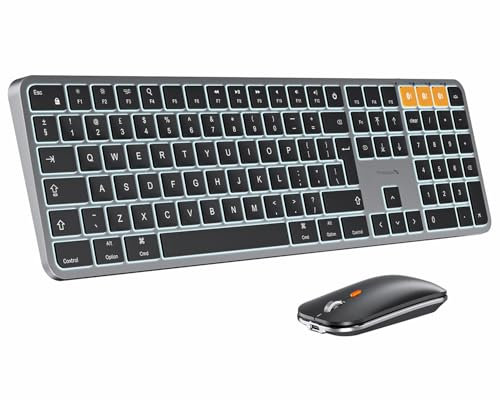
ProtoArc KM100-A Backlit Keyboard and Mouse for Mac, UK Layout, Full Size | Wireless Bluetooth Combo with Quiet Scissor-Switch Typing, Rechargeable, 3-Device Switching for Mac mini, MacBook, iMac, iPad
Offer

£ 44.99
free shipping | 1-2 Days
go to shop
Product description
- Bluetooth Keyboard for Mac: Bluetooth keyboard and mouse for Mac resembles magic keyboard in full size layout.
- Compatible with Mac OS 10.12 or later, for MacBook, MacBook Pro, MacBook Air, Mac Pro/Mini, iPad, or iPhone, supports Bluetooth 4.0 version or above. Note: Devices with Mac OS versions lower than 10.12 are not compatible.
- If your device has both iOS and Windows dual systems installed, it is not recommended to use this keyboard Backlit Illuminated Keys: This backlit wireless keyboard for mac comes equipped with soft white LED backlighting and boasts three adjustable brightness levels (low-mid-high) to suit your individual needs.
- Suitable for use in dimly lit environments, the gentle illumination won't strain your eyes, and the brightness can be easily customized to your liking Switch Up To 3 Devices: Bluetooth keyboard mouse for mac can connect to three different devices simultaneously through its triple Bluetooth channels.
- You can easily switch between the devices by clicking on the mode switch button Responsive Keys and Quiet Typing: This keyboard boasts a responsive scissor switch, allowing for efficient and hushed typing.
- The low-profile design and soft-touch keys elevate the typing experience to a new level of fingertip comfort and The mouse features three adjustable DPI levels of 1000/1600/2400, providing you with customizable sensitivity options Rechargeable and Power Saving: The keyboard and mouse for mac feature built-in rechargeable batteries, 1200mAh for keyboard, 300mAh for mouse.
- Additionally, if the keyboard is not used for 60min, it will enter sleep mode and can be awakened by pressing any key. Backlighting needs to be turned on again FN-Lock Key: Easy to switch between F-keys and Media keys by pressing Fn+Esc.
- By default, the keyboard has direct access to Media Keys. Just press FN + ESC and it will switch the way it responds. You can perform F1 ~ F12 functions to increase your workflow and productivity greatly Full-Size Design Consideration:
You might also be interested in these mice.
23% off


Logitech M185 Wireless Mouse, 2.4GHz with USB Mini Receiver, 12-Month Battery Life, 1000 DPI Optical Tracking, Ambidextrous, Compatible with PC, Mac, Laptop - Grey
Compact Mouse: With a comfortable and contoured shape, this Logitech ambidextrous wireless mouse feels great in either right or left hand and is far superior to a touchpad Durable and Reliable: This wireless USB mouse features a line-by-line scroll wheel, up to 1 year of battery life (2) thanks to a smart sleep mode function, and comes with the included AA battery Universal Compatibility: Your Logitech mouse works with your Windows PC, Mac, or laptop, so no matter what type of computer you own today or buy tomorrow your mouse will be compatible Plug and Play Simplicity: Just plug in the tiny nano USB receiver and start working in seconds with a strong, reliable connection to your cordless computer mouse up to 10 m (5) Better than touchpad: Get more done by adding M185 to your laptop; according to a recent study, laptop users who chose this mouse over a touchpad were 50% more productive (3) and worked 30% faster (4) Small and portable: The compact size and smooth cursor control make this PC mouse suitable for small to medium hands, tight workspaces or offices, and busy desktops The plastic parts in M185 include certified post consumer recycled plastic (77% for black and 49% for Charcoal/Grey, Black/Blue Glossy & Black/Red Glossy (6)) Certified carbon neutral; product carbon footprint: 3.97 kg CO2e
£ 4.99
To the product (28 offers)

Logitech G G502 HERO Wired Gaming Mouse, HERO 25K Sensor - Black | High performance pc mouse, 25,600 DPI, RGB, adjustable weights, 11 programmable buttons, on-board memory, PC/Mac, dual mode
Adjustable weights: Logitech gaming mouse lets you match your playing style; Arrange up to five 3.6 g weights on this wired mouse for laptop or PC for a personalized weight and balance configuration HERO Gaming Sensor: PC gaming mouse wired next generation HERO mouse sensor delivers precision tracking up to 25600 DPI with zero smoothing, filtering or acceleration 11 programmable buttons and dual mode hyper-fast scroll wheel: This gaming mouse with programmable buttons gives you fully customizable control over your gameplay LIGHTSYNC technology: This RGB gaming mouse provides fully customizable RGB lighting that can synchronize with your gaming (requires Logitech Gaming Software) Mechanical Switch Button Tensioning: Computer gaming mouse buttons use a metal spring tensioning system and metal pivot hinges in left and right buttons for a crisp, clean click feel and rapid click feedback
£ 35.78
free shipping
To the product (1 offer)

Razer DeathAdder Essential (2021) - Wired Gaming Mouse (Optical Sensor, 6400 DPI, 5 Programmable Buttons, Ergonomic Form Factor) Black
True 6,400 DPI Optical Sensor For fast and precise swipes: Always stay in control.
£ 10.74
free shipping
To the product (17 offers)

Logitech M240 Silent Bluetooth Mouse, Wireless, Compact | Portable, Smooth Tracking, 18-Month Battery, for Windows, macOS, ChromeOS, PC, Mac, Laptop, Tablets - Graphite
Pair and Play: With fast, easy Bluetooth wireless technology, you’re connected in seconds to this quiet cordless mouse —no dongle or port required Less Noise, More Focus: Silent mouse with 90% reduced click sound and the same click feel, eliminating noise and distractions for you and others around you (1) Long-Lasting Battery Life: Up to 18-month battery life with an energy-efficient auto sleep feature, so you can go longer between battery changes (2) Comfortable, Travel-Friendly Design: Small enough to toss in a bag; this slim and ambidextrous portable compact mouse guides either your right or left hand into a natural position Long-Range: Reliable, long-range Bluetooth wireless mouse works up to 10m/33 feet away from your computer (3) Works on multiple platforms: Experience seamless compatibility with Windows, macOS, Linux, ChromeOS, iPadOS, and Android operating systems; it is also a Works with Chromebook certified product Plastic parts in M240 Silent computer mouse include certified post-consumer recycled plastic (48% for Graphite, and 37% Off-white and Rose (7)) Compatible with MacBook Neo laptops: instant Bluetooth connection, seamless & color-matched Responsibly-sourced packaging: The packaging of Pebble Mouse 2 M350s (including product wrap) comes from FSC-certified forests and other controlled sources
£ 14.99
free shipping
To the product (16 offers)

Trust Silent Wireless Mouse, Battery Included, 800-1600 DPI | for Left and Right Hand User, Storable USB Micro Receiver, Compact Size, for PC Laptop Mac
FULLY WIRELESS – With up to 12 months of battery life that enables you to keep working for a long, long time
£ 6.99
free shipping
To the product (2 offers)

Logitech G G305 LIGHTSPEED Wireless Gaming Mouse, HERO 12K, Black | Wireless lightweight mouse, 12,000 DPI, 6 programmable buttons, 250h battery life, on-board memory, travel mouse, 3.4 oz
G305 wireless mouse, a Logitech wireless gaming mouse, boasts 250 hours of continuous gameplay on 1 AA battery; switch to Endurance mode via Logitech G HUB software to extend battery life up to 9 months The durable, compact Logitech gaming mouse wireless G305 with built-in nano receiver storage is a portable desktop mouse and great laptop travel companion for a gaming laptop so you can play anywhere G305 mouse is a lightweight mouse that delivers high maneuverability as a 3.4 oz computer mouse for PC gamers, using efficient lightweight mechanical design and ultra-efficient battery usage Ultra-fast LIGHTSPEED wireless technology in PC gaming mice gives you a low latency, lag-free gaming experience, delivering responsiveness and reliability with 1 ms report rate for competition-level performance In this PC gaming mouse, the next-generation optical HERO sensor delivers incredible performance and up to 10x the power efficiency over previous generations, with 400 IPS precision and up to 12,000 DPI sensitivity
£ 33.19
free shipping
To the product (11 offers)


Logitech B100 Wired USB Mouse | 3-Buttons, Optical Tracking, Ambidextrous PC / Mac / Laptop/Chromebook - Black
Durable and Affordable : 3-button wired USB mouse with optical tracking in black, compatible with most desktop computers, Macbooks and laptops with a 3-year hardware warranty Universal Compatibility : Windows Vista or Windows 7, Windows 8, Windows 10, Linux kernel 2.4+, Mac OS X 10.3.9 or later, Chrome OS Great Comfort : Left or right-handed, this full-size ambidextrous computer mouse provides maximum comfort for extended use where it's needed most Plug and Play : The set-up of this Logitech mouse is simple; just plug the device into your computer USB port and you're ready to go Smooth Cursor Control : This computer and laptop mouse provides 800 DPI optical precision, meaning accurate and efficient control when editing documents and browsing the Web Upgrade to Logitech B220 Wireless Silent Mouse : Reliable wireless connection, silent clicks and long battery life (18 months)
£ 3.44
To the product (17 offers)


Logitech M705 Marathon Wireless Mouse, 2.4 GHz USB Unifying Receiver | 1000 DPI, 5-Programmable Buttons, 3-Year Battery, Compatible with PC, Mac, Laptop, Chromebook - Black
3-Year Battery Life: This wireless office mouse features an auto-sleep power-saving mode and on/off switch so you can enjoy up to 3 years (1) of charge on 2 AA batteries Designed for Comfort: Sculpted with comfort in mind, your wireless computer mouse follows the natural curve of your right hand, and all controls are within your reach Hyper-fast Scrolling: Dual-mode scrolling lets you switch between speed and precision with a click, so you can fly through long webpages, or go line-by-line Wireless Freedom: One tiny unifying receiver pairs up to 6 compatible devices, creating a clutter-free workspace; the USB receiver provides a strong, reliable connection within up to 10 m (3) Extra Productivity: This cordless mouse features 5 customisable buttons, including forward and back thumb buttons; create shortcuts, jump to full-screen, open applications and more Broad Compatibility: Mouse M705 is compatible with macOS and Windows, and is a Works with Chromebook(2) certified product
£ 1.00
free shipping
To the product (18 offers)

Razer Basilisk V3 - Wired Customisable Gaming Mouse (10+1 Programmable Buttons, HyperScroll Tilt Wheel, 11 Chroma RGB Lighting Zones, Optical Mouse Switches, Focus+ 26K DPI Optical Sensor) Black
10+1 Programmable Buttons For Limitless Configurations: Assign all your macros and secondary functions across 11 programmable buttons—including its acclaimed multi-function trigger—to execute essential actions like push-to-talk, ping, and more.
£ 38.00
free shipping
To the product (22 offers)
26% off

Logitech G G203 Prodigy Wired Gaming Mouse - Black | 8,000 DPI, RGB, lightweight, 6 programmable buttons, on-board memory, computer mouse wired, Compatible with PC/Mac
Primary buttons on this wired mouse are mechanical and tensioned with durable metal springs for reliability, performance and excellent feel.
£ 22.99
To the product (12 offers)

Logitech MX Vertical Ergonomic Mouse, Multi-Device, Bluetooth or 2.4GHz Wireless with USB Unifying Receiver, 4000 DPI Optical Tracking, 4 Buttons, Fast Charging, Laptop/PC/Mac/iPad OS- Black
Natural handshake position : The Logitech MX Vertical's natural handshake position helps reduce muscular activity by 10 percent compared to a standard computer mouse - without any loss in overall performance Improved wrist posture : This wired and wireless bluetooth mouse features a distinct 57 Degree vertical angle that reduces the pressure on your wrist; it also ensures your thumb is positioned comfortably on the thumb rest User tested.
£ 48.99
free shipping
To the product (19 offers)

HP 150 Wireless Mouse |1600 DPI Optical Mouse Sensor | 2.4GHz Wireless USB Receiver Included | Ambidextrous Design | 3 Buttons | Scroll Wheel | Up to 10 Month Battery | Black
WIRELESS PRECISE COMFORTABLE: This precise and comfy wireless mouse is designed to get you clicking quickly and keep you productive all day, wherever your journey takes you
£ 8.99
To the product (13 offers)