
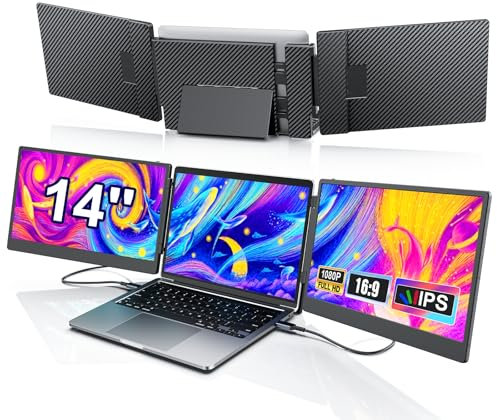
Livelect-m 14" Triple Laptop Screen Extender, FHD 1080P IPS Laptop Monitor Extender, Detachable Screen Travel Monitor Laptops with Speakers, Plug&Play, Compatible with Win/Mac/Android
Show on Amazon
Show on Amazon
Offer

£ 189.99
free shipping | 1-2 Days
go to shop
Price trend
Product description
- Powerful Visual Experience The laptop screen extender Full HD screen (1920 1080) has a 120% sRGB colour gamut and 16.7 million colours, which ensure accurate and rich colours, drastically reduce colour deviations and better reproduce the image effect. 300 nits brightness and a contrast ratio of 1000 1 ensure a picture with clear layers and sharp details. Optimised for video production, visual design, animation and gaming, it easily adapts to different scenarios and helps you get your work done efficiently.
- Highly Efficient Office Triple Portable Laptop Monitor Extension supports two expansion mirroring modes, enabling simultaneous multitasking and increasing work efficiency by up to 300 per cent. The innovative detachable design allows the screen to be freely combined for dual screen collaboration or combined use. The multifunctional adjustment buttons allow you to set the brightness, colour tone and sound individually. Whether video conferencing, business presentation or mobile office, it is easy to handle.
- Ergonomic Design The laptop monitor extender Plug-and-play compatibility with Windows, Mac and Android devices. The monitor is designed to be flexible and compatible with laptops of all sizes without the need for mounting. It can be securely mounted by stretching it to the width of the laptop, increasing protection against potential damage to the laptop. Its improved foldable 90 degree wide stand supports a 0-180 degree rotation for stability and portability and can be easily opened and closed for storage.
- Efficient Customer Support All products are covered by a one-year warranty. We are aware that some laptop models require special settings when connected to two screens. Due to the limitations of the laptop itself, there may be compatibility issues, such as only one monitor works, displaying No Signal , Power Saving Mode , black screen and so on. We will help you solve the problem, we will give you an answer within 24 hours on working days. (Note When connecting the HDMI cable, you need to connect to the USB WITH DP port of the screen).
- M1 M2 M3 Chip If your mac is powered by the (M1 M2 M3 M2) chipset, you need to purchase a customised hub (H5-T) to enable video output via the computer port. The H5-T cable only has a video output, but no power output. You must connect an external power supply for the screen extender to work properly. If you do not want to use the H5-T cable, you can also purchase a docking station to add more ports to your computer. (Please contact us if you would like a recommendation for a docking station or to purchase our customised H5-T).
You might also be interested in these dell monitors uk.

Dell SE2222H 21.5 Inch Full HD (1920x1080) Monitor, 60Hz, VA, HDMI, VGA, 3 Year Warranty, Black
Sturdy and compact Free up your workspace and regain your desk real estate with this small-footprint monitor, featuring a 23% smaller stand. A built-in power supply unit and cable holder help to further reduce clutter.
free shipping
Check price

Dell SE2422H 24 Inch Monitor – Full HD (1920x1080), 75Hz, VA Panel, AMD FreeSync, ComfortView, HDMI & VGA Connectivity, Slim Bezel, Tilt Stand – 3-Year Warranty
Eco-Friendly and Energy Efficient Shipped in eco-conscious packaging with 75% recycled cardboard. PowerNap feature reduces power consumption by dimming the screen or putting it to sleep when not in use.
free shipping
Check price

Dell S2421NX 24 Inch Full HD (1920x1080) Monitor, 75Hz, IPS, 4ms, AMD FreeSync, Ultrathin Bezel, 2x HDMI, 3 Year Warranty, Black
This TÜV-certified monitor has a flicker-free screen with ComfortView, a feature that reduces harmful blue light emissions. It s designed to optimize eye comfort even over extended viewing like your next movie marathon.
free shipping
Check price

Dell SE2722HX 27 Inch Monitor – Full HD (1920 x 1080), 75Hz, VA Panel, AMD FreeSync, ComfortView, HDMI & VGA Connectivity, Slim Bezel, Tilt Stand, Black – 3-Year Warranty
Expansive Full HD Display 27-inch Full HD (1920 x 1080) screen delivers sharp and vibrant visuals, ideal for home or office use. The slim bezel design maximizes your viewing area, giving you an immersive experience.
free shipping
Check price

Dell P2725H 27 Inch Full HD (1920x1080) Monitor, 100Hz, IPS, 5ms, 99% sRGB, USB-C, DisplayPort, HDMI, VGA, 4x USB, 3 Year Warranty, Black
Stay productive. Get enhanced visual comfort and seamless connectivity with this 27-in FHD monitor, certified by TÜV for 4-star eye comfort
free shipping
Check price
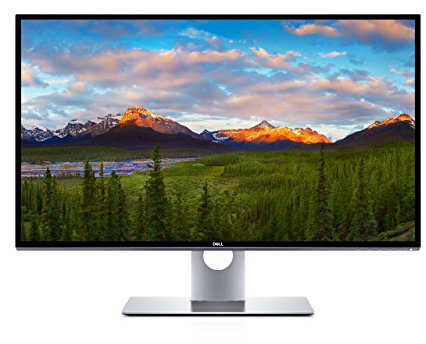
Dell UltraSharp 32 PremierColor UltraHD 8K Monitor UP3218K 80.1cm 31.5" Black UK *Same as 210-AMFJ*
Color Black
free shipping
Check price

Dell E2222HS 21.5 Inch Full HD (1920x1080) Monitor, 60Hz, VA, 5ms, Height Adjust, Built-in Speakers, DisplayPort, HDMI, VGA, 3 Year Warranty, Black
E2222HS 21.5IN LED 16 9 1920X1080 5MS 3000 1 DP HDM
free shipping
Check price

Dell P2222H 21.5 Inch Full HD (1920x1080) Monitor, 60Hz, IPS, 5ms, 99% sRGB, DisplayPort, HDMI, VGA, 5x USB, 3 Year Warranty, Black
Optimize eye comfort with ComfortView Plus, an always-on, built-in screen that reduces potentially harmful blue light emissions while delivering excellent colour accuracy.
free shipping
Check price

Dell S2425H 24 Inch Full HD (1920x1080) Monitor, 100Hz, IPS, 4ms, 99% sRGB, Built-in Speakers, Ultrathin Bezel, 2x HDMI, 3 Year Warranty, White
Choose your audio experience with six preset profiles Standard, Movie, Game, Music, Voice, and one customisable profile.
free shipping
Check price

Dell S2721NX 27 Inch Full HD (1920x1080) Monitor, 75Hz, IPS, 4ms, AMD FreeSync, Ultrathin Bezel, 2x HDMI, 3 Year Warranty, Black
3 Year Advanced Exchange Service If your warranty issue can t be resolved remotely, Dell will send a replacement monitor the next business day if deemed necessary after phone online diagnosis during your Limited Hardware Warranty term. Shipping times may vary by location.
free shipping
Check price

Dell 24 Video-conferencing Monitor P2418HZ 60.5cm (23.8") Black UK *Same as 210-AOFE*
DELL-P2418HZM-2
free shipping
Check price

Dell P2419H 24" Full High Definition IPS LED Monitor , Black
Push your productivity
free shipping
Check price

Dell S2722QC USB-C 27 Inch 4K UHD (3840x2160) Monitor, 60Hz, IPS, 4ms, AMD FreeSync, 99% sRGB, HDR, Built-in Speakers, USB-C, 2x HDMI, 2x USB, 3 Year Warranty, Silver
Leisure gaming Smooth, tear-free experience with AMD FreeSync technology, featuring up to 60Hz refresh rate.
free shipping
Check price

Dell S2725DS 27 Inch QHD (2560x1440) Monitor, 100Hz, IPS, 4ms, 99% sRGB, Height Adjust, Built-in Speakers, DisplayPort, 2x HDMI, 3 Year Warranty, White
A 27 inch QHD monitor with 5W built-in speakers and a lifestyle-inspired design that blends into any living space
free shipping
Check price

Dell P2422H 24 Inch Full HD (1920x1080) Monitor, 60Hz, IPS, 5ms, 99% sRGB, DisplayPort, HDMI, VGA, 5x USB, 3 Year Warranty, Black
Optimize eye comfort with ComfortView Plus, an always-on, built-in screen that reduces potentially harmful blue light emissions while delivering excellent colour accuracy.
Check price
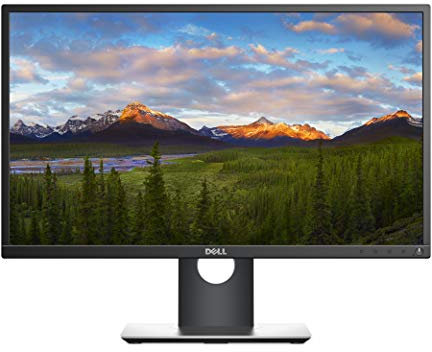
Dell 27 Monitor P2717H 68.6cm (27) VGA HDMI DP Black UK 3 Year Advanced Exchange
Complete clarity get excellent picture quality with consistent colour representation across an ultra-wide viewing angle and a high 4 million 1 dynamic contrast ratio.
free shipping
Check price

Dell P2222H - No Stand - LED monitor - 22" (21.5" viewable) - 1920 x 1080 Full HD (1080p) @ 60 Hz - IPS - 250 cd/m² - 1000:1-5 ms - HDMI, VGA, DisplayPort - with 3 years Advanced Exchange Service
DELL - DISPLAY B2B 22 MNTR P2222H NO STAND 54.6CM 21.5IN
free shipping
Check price

Dell SE2225H 21.5 Inch Full HD (1920x1080) Monitor, 75Hz, VA, 5ms, VESA (100x100mm), HDMI, VGA, 3 Year Warranty, Black
VIBRANT COLOR AND DEEP CONTRAST The VA panel ensures a 3000 1 contrast ratio, delivering vivid colors and deeper blacks for more immersive visuals, along with a 178 wide viewing angle for consistent image quality from any position.
Check price
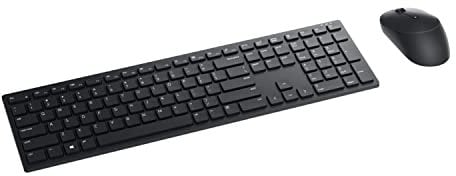
Dell KM5221W Pro Wireless Keyboard and Mouse, UK (QWERTY), 2.4GHz, 128-bit AES Encryption, 4000 dpi, Windows, Apple, Android, Linux and Chrome, (Black)
Enhance your all-day productivity with this RF 2.4GHz wireless keyboard and mouse combo.
free shipping
Check price

Dell P2722H 27 Inch Full HD (1920x1080) Monitor, 60Hz, IPS, 5ms, 99% sRGB, DisplayPort, HDMI, VGA, 5x USB, 3 Year Warranty, Black
Optimize eye comfort with ComfortView Plus, an always-on, built-in screen that reduces potentially harmful blue light emissions while delivering excellent colour accuracy.
free shipping
Check price